

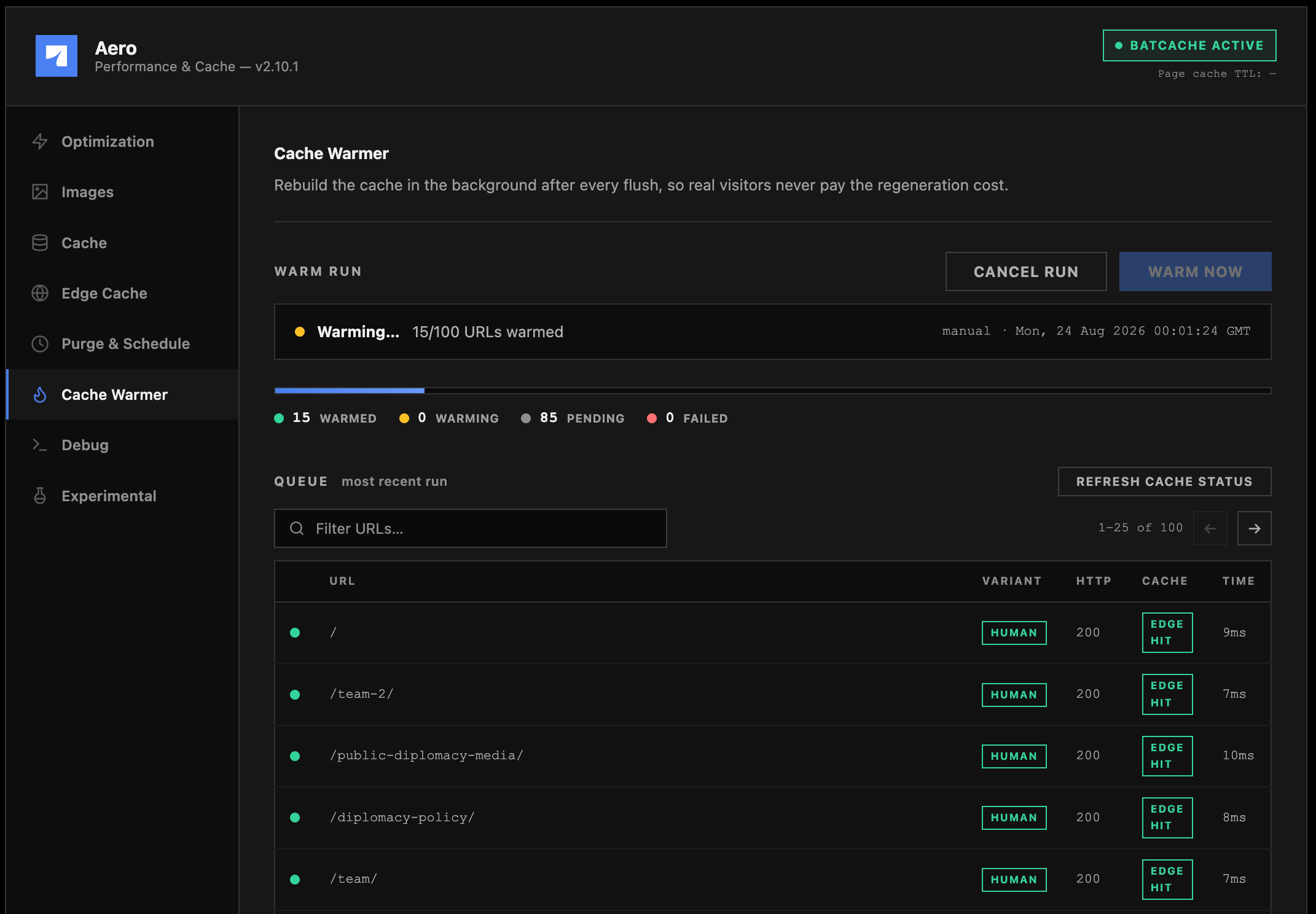
Warm Now and the queue
Two controls sit at the top of the screen. Warm Now kicks off a run immediately, and Cancel Run stops one that’s already going, marking anything still pending or warming as skipped rather than leaving it hanging. You won’t need either one day to day once “Warm automatically after every flush” is on, but they’re there for testing a settings change or manually recovering after something unusual happens to your cache. A status line tracks each run: Idle or Running, a one-line summary of what triggered it, and four live counts (warmed, warming, pending, failed) while it’s in progress. Runs cap out at 2 hours, and if any single URL gets stuck at “warming” for more than 5 minutes, it’s marked failed and the run keeps moving instead of stalling on one bad page. Below that, the Queue table lists the most recent run: URL, which variant hit it (regular visitor or bot), the HTTP status returned, whether the Cache column confirms it via a follow-up check, and how long the request took. Refresh Cache Status re-runs that check against the last 20 completed items without starting a new warm pass, handy if you want to confirm a page is still serving from cache well after the original run finished. Anything the check finds cold gets warmed by the act of checking it.Reading the Variant and Cache columns
Both the Queue table above and the Re-warms table further down share these two columns, and they mean the same thing in each, just displayed a little differently. Variant is which browser signature made the request. In the Queue table, every row is tagged HUMAN or BOT: a normal-browser request versus one sent with a PageSpeed/Lighthouse-style user agent, which only shows up when warming the Guest bucket is on. The Re-warms table condenses this into one row per URL instead of two, so its Variants column reads H for a human-only warm or H+B when the same URL got warmed as both a visitor and a bot. Cache is the actual result of checking the page, and a couple of these states look like problems when they’re not:Warmer settings
Enable Cache Warmer: Safe, recommended
Enable Cache Warmer: Safe, recommended
Master switch. With this off, nothing warms, manually or automatically, regardless of what else is configured below.
Warm automatically after every flush: Safe, recommended
Warm automatically after every flush: Safe, recommended
The moment any full flush completes (manual, admin bar, automated trigger, or scheduled), the warmer rebuilds cache before real visitors arrive. This is the setting that actually delivers on the promise above; without it, warming only happens when you remember to trigger it by hand.
Also warm the Guest (bot) cache bucket: Situational, only relevant with Guest Mode
Also warm the Guest (bot) cache bucket: Situational, only relevant with Guest Mode
When Guest Mode cache isolation is active (see the Experimental page), each URL gets warmed twice: once as a regular visitor, once as a PageSpeed-style bot, so both buckets stay hot. This doubles request volume during warming. It’s inert and grayed out if Guest Mode isolation is off.
Include URLs from llms.txt: Safe if you maintain an llms.txt file
Include URLs from llms.txt: Safe if you maintain an llms.txt file
If a file exists at
/llms.txt, the warmer treats it as a curated list of your most important pages and warms those ahead of the general sitemap crawl. A Preview llms.txt button shows you exactly which URLs get picked up (matches are highlighted), and Re-scan llms.txt re-checks for the file if you’ve just added or changed one, since detection doesn’t happen on every page load. Read the callout below before you file this under “SEO,” because Google specifically says it doesn’t count as one.Priority Edge, keeping top URLs admitted at the Edge: Safe, recommended
Priority Edge, keeping top URLs admitted at the Edge: Safe, recommended
Runs a lightweight pass every 10 minutes against the URLs in your Priority Edge list (below), keeping them continuously admitted at the fastest cache tier. With just a homepage in the list, that’s three tiny requests every ten minutes, negligible load for guaranteed fast serving on the pages that matter most.
Warming behavior
Re-warms
This is the small, fast sibling to the full warm run above, and it’s a different mechanism entirely. Edit a post, publish something, trash a page, approve a comment, or purge a single URL from Purge & Schedule: each of those actions purges a specific, small set of URLs, and this is what re-fills them before the next visitor lands on a cold page. You’ll find the Re-warms panel on the Cache Warmer screen itself, sitting between the main warm queue and Priority Edge. It’s empty outside of active purging, then fills in live as URLs move through pending, warming, and done, each row tagged with the reason it was purged in the first place. A few things worth knowing about how it behaves:- It’s capped at 40 URLs and kicks off roughly 10 seconds after the purge settles. That short delay gives the Edge purge and the Batcache group bump time to finish, so the warm request captures fresh output instead of racing a purge that hasn’t landed yet.
- The homepage jumps to the front of the queue automatically, since it’s the page almost every visitor hits first.
- With Guest Mode isolation on and the bot bucket enabled, each URL here warms twice: once as a regular visitor, once as a bot, same behavior as the main warmer, shown as H+B in the Variants column (see Reading the Variant and Cache columns for what all these column values mean).
- A full flush (manual, admin bar, scheduled, whatever the trigger) wipes this list entirely. Once a full flush happens, every entry in the re-warm history describes a cache entry that no longer exists, so Aero clears it out rather than showing you stale data.
Priority Edge
A short list (up to 10 URLs) that gets kept continuously admitted at WP Stratos’s Edge Cache tier, the fastest possible serve, regardless of normal traffic patterns. Edge admission normally requires two visits within two minutes; Priority Edge sidesteps that by generating the qualifying hits itself on a 10-minute cycle, then verifies admission actually took by checking the response’sx-ac header.
Use this for your handful of highest-value pages: homepage, primary conversion page, anything you’d be embarrassed to have serve slowly during a spike in interest. General warming and the URL limit setting handle the rest of the site.